
Arrays sit at the heart of JavaScript development. Whether you’re processing API responses, managing UI state, or handling user input, removing elements from arrays is something you’ll do repeatedly. Yet, this seemingly simple task is often the root cause of subtle bugs, unexpected UI behavior, and performance issues when done incorrectly.
In this guide, I’ll break down the correct and production-safe ways to remove elements from a JavaScript array, based on how real-world applications behave, not just theory.
Why Removing Array Elements Needs Care
JavaScript arrays are mutable by default. That flexibility is powerful, but it also means one wrong method can unintentionally change shared data, especially in large applications.
In UI-driven environments, incorrect array mutation can even contribute to browser or framework warnings like the
resizeobserver loop completed with undelivered notifications error, which often appears when state updates happen in uncontrolled ways.
Understanding which method mutates an array and which does not is critical before touching production code.
Removing an Element by Index
Using splice() (Most Direct Approach)
When you know the index of the element, splice() is the most precise tool.
let numbers = [10, 20, 30, 40];
numbers.splice(2, 1);

// Result: [10, 20, 40]
Key characteristics:
- Modifies the original array
- Removes elements starting at a specific index
- Returns the removed elements
This is ideal when index position matters and mutation is acceptable.
Why You Should Avoid delete
Some developers try this approach:
let arr = [1, 2, 3];
delete arr[1];
This leaves a hole:
[1, undefined, 3]The array length remains the same, and iterations behave unpredictably. delete removes a property, not an array element, which often leads to silent bugs.
Removing an Element by Value
Most of the time, you don’t know the index — you know the value.
Using indexOf() with splice()
let fruits = ["apple", "banana", "orange"];
let index = fruits.indexOf("banana");

if (index !== -1) {
  fruits.splice(index, 1);
}
This approach works well for single occurrences but mutates the array and requires guard checks.
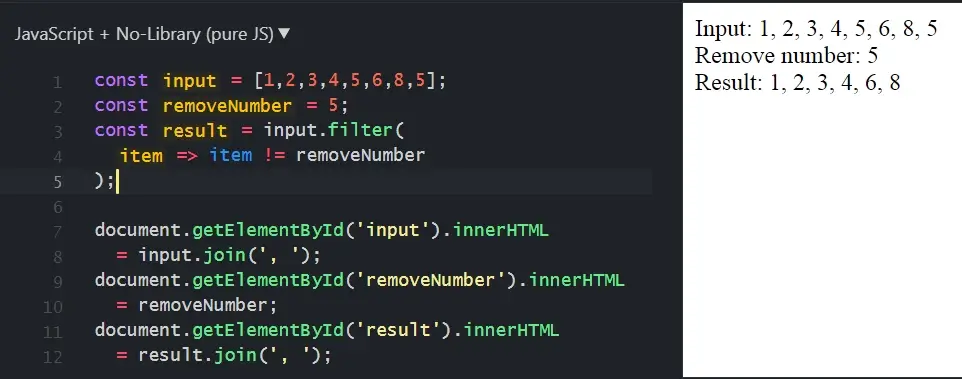
Using filter() (Recommended for Clean Code)
If you want a safer, more predictable approach:
let fruits = ["apple", "banana", "orange"];
let updatedFruits = fruits.filter(fruit => fruit !== "banana");
This method does not mutate the original array, removes all matching values, and is ideal for functional or state-based code.
Removing Multiple Matching Values
When duplicates exist, filter() is the correct solution.
let values = [2, 3, 2, 4, 2];
let cleaned = values.filter(v => v !== 2);

// Result: [3, 4]
Trying to remove multiple values using splice() inside loops often introduces index-shifting bugs.
Removing the First or Last Element
JavaScript provides direct methods for edge cases:
let queue = [1, 2, 3];

queue.shift(); // removes first element
queue.pop();   // removes last element
Both methods mutate the array and are suitable for stack or queue-based logic.
Immutable Removal for Modern Applications
In frameworks like React, immutability is required for predictable rendering.
Using slice() and Spread Syntax
let letters = ["a", "b", "c", "d"];
let indexToRemove = 1;

let result = [
  ...letters.slice(0, indexToRemove),
  ...letters.slice(indexToRemove + 1)
];

// Result: ["a", "c", "d"]
This approach keeps the original array untouched and avoids unexpected re-renders.
When using modern syntax like this, ensure your environment is configured correctly. Otherwise, you may encounter issues such as
syntaxerror: cannot use import statement outside a module, which is unrelated to array logic but frequently appears alongside it.
Removing Objects from an Array
Arrays of objects require property-based checks.
let users = [
  { id: 1, name: "Alex" },
  { id: 2, name: "Sam" }
];

let filteredUsers = users.filter(user => user.id !== 2);
Comparing objects by reference is unreliable. Property-based filtering is safer and more maintainable.
Performance vs Readability
Mutating methods like splice(), pop(), and shift() are faster for large datasets, while filter() offers better predictability and safety.
In real projects, predictability usually outweighs micro-optimizations. Also, when refactoring array logic, manage your version control carefully to avoid issues like
please commit your changes or stash them before you merge.
Final Thoughts
Removing elements from arrays isn’t about memorizing methods. It’s about choosing the right behavior for your application.
- Use mutating methods when control is tight
- Prefer immutable patterns for scalable code
- Avoid shortcuts that introduce hidden bugs
Once these patterns become second nature, array manipulation becomes predictable, readable, and production-safe.
FAQs: JavaScript Remove Element from Array
What is the safest way to remove an element from a JavaScript array without modifying the original array?
Using non-mutating methods like filter() or combining slice() with spread syntax is the safest approach. These methods return a new array and prevent side effects.
Does removing an element from a JavaScript array always reduce its length?
Methods like splice(), pop(), and shift() reduce the array length. The delete operator does not, leaving empty slots instead.
How can I remove all occurrences of a value from a JavaScript array?
The filter() method removes all matching values and returns a clean new array, making it ideal when duplicates exist.
When should I use splice() instead of filter()?
Use splice() when you know the exact index and want to modify the original array. Use filter() when immutability or shared state is involved.
How do I remove an object from an array based on a specific property?
Use filter() with a condition targeting a unique property such as an id. This avoids reference comparison issues.

